Asynchronous Parallel Block Blob Transfers with Progress Change Notification
UPDATE March 6, 2013:
This code has been significantly updated and the new version can be found at https://blogs.msdn.com/b/kwill/archive/2013/03/06/asynchronous-parallel-block-blob-transfers-with-progress-change-notification-2-0.aspx.
----------------------------------------------------------
Have you ever wanted to asynchronously upload or download blobs from a client application and be able to show progress change notifications to the end user? I started off using the System.Net.WebClient class and calling UploadFileAsync or DownloadFileAsync and subscribing to the ProgressChanged event handlers. This works fairly well for most scenarios, but there are a couple problems with this approach: UploadFileAsync will throw an OutOfMemoryException on large files due to the fact that it tries to read the entire file into a buffer prior to sending it, and the WebClient transfers are slow compared to taking advantage of transferring a blob using multiple parallel blocks.
You could also use the CloudBlockBlob class and call BeginUploadFromStream or BeginDownloadFromStream, but you don’t get progress change notifications or parallel block uploads. You could wrap the storage client stream in a ProgressStream to get the progress change notifications, but then you still don’t get the speed of parallel block uploads. If you don’t need the extra speed of the parallel block uploads, but you still want progress change notifications and an easy programming model I would suggest checking out the code from https://appfabriccat.com/2011/02/exploring-windows-azure-storage-apis-by-building-a-storage-explorer-application/.
To get all of the features I wanted I ended up writing my own BlobTransfer class which gives me the following benefits:
- Fast uploads and downloads by using parallel block blob transfers. Check out https://azurescope.cloudapp.net/Default.aspx for some of the performance benefits.
- Asynchronous programming model
- Progress change notifications
BlobTransfer.cs
using System;
using System.Text;
using System.ComponentModel;
using System.Windows.Forms;
using System.Collections.Generic;
using System.Threading;
using System.Runtime.Remoting.Messaging;
using Microsoft.WindowsAzure;
using Microsoft.WindowsAzure.StorageClient;
using Microsoft.WindowsAzure.StorageClient.Protocol;
using System.IO;
using System.Net;
using System.Security.Cryptography;
using System.Linq;
namespace BlobTransferUI
{
class BlobTransfer
{
// Async events and properties
public event AsyncCompletedEventHandler TransferCompleted;
public event EventHandler<BlobTransferProgressChangedEventArgs> TransferProgressChanged;
private delegate void BlobTransferWorkerDelegate(MyAsyncContext asyncContext, out bool cancelled, AsyncOperation async);
private bool TaskIsRunning = false;
private MyAsyncContext TaskContext = null;
private readonly object _sync = new object();
// Used to calculate download speeds
Queue<long> timeQueue = new Queue<long>(100);
Queue<long> bytesQueue = new Queue<long>(100);
DateTime updateTime = System.DateTime.Now;
// BlobTransfer properties
private string m_FileName;
private CloudBlockBlob m_Blob;
public TransferTypeEnum TransferType;
public void UploadBlobAsync(CloudBlob blob, string LocalFile)
{
TransferType = TransferTypeEnum.Upload;
//attempt to open the file first so that we throw an exception before getting into the async work
using (FileStream fs = new FileStream(LocalFile, FileMode.Open, FileAccess.Read)) { }
m_Blob = blob.ToBlockBlob;
m_FileName = LocalFile;
BlobTransferWorkerDelegate worker = new BlobTransferWorkerDelegate(UploadBlobWorker);
AsyncCallback completedCallback = new AsyncCallback(TaskCompletedCallback);
lock (_sync)
{
if (TaskIsRunning)
throw new InvalidOperationException("The control is currently busy.");
AsyncOperation async = AsyncOperationManager.CreateOperation(null);
MyAsyncContext context = new MyAsyncContext();
bool cancelled;
worker.BeginInvoke(context, out cancelled, async, completedCallback, async);
TaskIsRunning = true;
TaskContext = context;
}
}
public void DownloadBlobAsync(CloudBlob blob, string LocalFile)
{
TransferType = TransferTypeEnum.Download;
m_Blob = blob.ToBlockBlob;
m_FileName = LocalFile;
BlobTransferWorkerDelegate worker = new BlobTransferWorkerDelegate(DownloadBlobWorker);
AsyncCallback completedCallback = new AsyncCallback(TaskCompletedCallback);
lock (_sync)
{
if (TaskIsRunning)
throw new InvalidOperationException("The control is currently busy.");
AsyncOperation async = AsyncOperationManager.CreateOperation(null);
MyAsyncContext context = new MyAsyncContext();
bool cancelled;
worker.BeginInvoke(context, out cancelled, async, completedCallback, async);
TaskIsRunning = true;
TaskContext = context;
}
}
public bool IsBusy
{
get { return TaskIsRunning; }
}
public void CancelAsync()
{
lock (_sync)
{
if (TaskContext != null)
TaskContext.Cancel();
}
}
private void UploadBlobWorker(MyAsyncContext asyncContext, out bool cancelled, AsyncOperation async)
{
cancelled = false;
ParallelUploadFile(asyncContext, async);
// check for Cancelling
if (asyncContext.IsCancelling)
{
cancelled = true;
}
}
private void DownloadBlobWorker(MyAsyncContext asyncContext, out bool cancelled, AsyncOperation async)
{
cancelled = false;
ParallelDownloadFile(asyncContext, async);
// check for Cancelling
if (asyncContext.IsCancelling)
{
cancelled = true;
}
}
private void TaskCompletedCallback(IAsyncResult ar)
{
// get the original worker delegate and the AsyncOperation instance
BlobTransferWorkerDelegate worker = (BlobTransferWorkerDelegate)((AsyncResult)ar).AsyncDelegate;
AsyncOperation async = (AsyncOperation)ar.AsyncState;
bool cancelled;
// finish the asynchronous operation
worker.EndInvoke(out cancelled, ar);
// clear the running task flag
lock (_sync)
{
TaskIsRunning = false;
TaskContext = null;
}
// raise the completed event
AsyncCompletedEventArgs completedArgs = new AsyncCompletedEventArgs(null, cancelled, null);
async.PostOperationCompleted(delegate(object e) { OnTaskCompleted((AsyncCompletedEventArgs)e); }, completedArgs);
}
protected virtual void OnTaskCompleted(AsyncCompletedEventArgs e)
{
if (TransferCompleted != null)
TransferCompleted(this, e);
}
private double CalculateSpeed(long BytesSent)
{
double speed = 0;
if (timeQueue.Count == 80)
{
timeQueue.Dequeue();
bytesQueue.Dequeue();
}
timeQueue.Enqueue(System.DateTime.Now.Ticks);
bytesQueue.Enqueue(BytesSent);
if (timeQueue.Count > 2)
{
updateTime = System.DateTime.Now;
speed = (bytesQueue.Max() - bytesQueue.Min()) / TimeSpan.FromTicks(timeQueue.Max() - timeQueue.Min()).TotalSeconds;
}
return speed;
}
protected virtual void OnTaskProgressChanged(BlobTransferProgressChangedEventArgs e)
{
if (TransferProgressChanged != null)
TransferProgressChanged(this, e);
}
// Blob Upload Code
// 200 GB max blob size
// 50,000 max blocks
// 4 MB max block size
// Try to get close to 100k block size in order to offer good progress update response.
private int GetBlockSize(long fileSize)
{
const long KB = 1024;
const long MB = 1024 * KB;
const long GB = 1024 * MB;
const long MAXBLOCKS = 50000;
const long MAXBLOBSIZE = 200 * GB;
const long MAXBLOCKSIZE = 4 * MB;
long blocksize = 100 * KB;
//long blocksize = 4 * MB;
long blockCount;
blockCount = ((int)Math.Floor((double)(fileSize / blocksize))) + 1;
while (blockCount > MAXBLOCKS - 1)
{
blocksize += 100 * KB;
blockCount = ((int)Math.Floor((double)(fileSize / blocksize))) + 1;
}
if (blocksize > MAXBLOCKSIZE)
{
throw new ArgumentException("Blob too big to upload.");
}
return (int)blocksize;
}
private void ParallelUploadFile(MyAsyncContext asyncContext, AsyncOperation asyncOp)
{
BlobTransferProgressChangedEventArgs eArgs = null;
object AsyncUpdateLock = new object();
// stats from azurescope show 10 to be an optimal number of transfer threads
int numThreads = 10;
var file = new FileInfo(m_FileName);
long fileSize = file.Length;
int maxBlockSize = GetBlockSize(fileSize);
long bytesUploaded = 0;
int blockLength = 0;
// Prepare a queue of blocks to be uploaded. Each queue item is a key-value pair where
// the 'key' is block id and 'value' is the block length.
Queue<KeyValuePair<int, int>> queue = new Queue<KeyValuePair<int, int>>();
List<string> blockList = new List<string>();
int blockId = 0;
while (fileSize > 0)
{
blockLength = (int)Math.Min(maxBlockSize, fileSize);
string blockIdString = Convert.ToBase64String(ASCIIEncoding.ASCII.GetBytes(string.Format("BlockId{0}", blockId.ToString("0000000"))));
KeyValuePair<int, int> kvp = new KeyValuePair<int, int>(blockId++, blockLength);
queue.Enqueue(kvp);
blockList.Add(blockIdString);
fileSize -= blockLength;
}
m_Blob.DeleteIfExists();
BlobRequestOptions options = new BlobRequestOptions()
{
RetryPolicy = RetryPolicies.RetryExponential(RetryPolicies.DefaultClientRetryCount, RetryPolicies.DefaultMaxBackoff),
Timeout = TimeSpan.FromSeconds(90)
};
// Launch threads to upload blocks.
List<Thread> threads = new List<Thread>();
for (int idxThread = 0; idxThread < numThreads; idxThread++)
{
Thread t = new Thread(new ThreadStart(() =>
{
KeyValuePair<int, int> blockIdAndLength;
using (FileStream fs = new FileStream(file.FullName, FileMode.Open, FileAccess.Read))
{
while (true)
{
// Dequeue block details.
lock (queue)
{
if (asyncContext.IsCancelling)
break;
if (queue.Count == 0)
break;
blockIdAndLength = queue.Dequeue();
}
byte[] buff = new byte[blockIdAndLength.Value];
BinaryReader br = new BinaryReader(fs);
// move the file system reader to the proper position
fs.Seek(blockIdAndLength.Key * (long)maxBlockSize, SeekOrigin.Begin);
br.Read(buff, 0, blockIdAndLength.Value);
// Upload block.
string blockName = Convert.ToBase64String(BitConverter.GetBytes(
blockIdAndLength.Key));
using (MemoryStream ms = new MemoryStream(buff, 0, blockIdAndLength.Value))
{
string blockIdString = Convert.ToBase64String(ASCIIEncoding.ASCII.GetBytes(string.Format("BlockId{0}", blockIdAndLength.Key.ToString("0000000"))));
string blockHash = GetMD5HashFromStream(buff);
m_Blob.PutBlock(blockIdString, ms, blockHash, options);
}
lock (AsyncUpdateLock)
{
bytesUploaded += blockIdAndLength.Value;
int progress = (int)((double)bytesUploaded / file.Length * 100);
// raise the progress changed event
eArgs = new BlobTransferProgressChangedEventArgs(bytesUploaded, file.Length, progress, CalculateSpeed(bytesUploaded), null);
asyncOp.Post(delegate(object e) { OnTaskProgressChanged((BlobTransferProgressChangedEventArgs)e); }, eArgs);
}
}
}
}));
t.Start();
threads.Add(t);
}
// Wait for all threads to complete uploading data.
foreach (Thread t in threads)
{
t.Join();
}
if (!asyncContext.IsCancelling)
{
// Commit the blocklist.
m_Blob.PutBlockList(blockList, options);
}
}
/// <summary>
/// Downloads content from a blob using multiple threads.
/// </summary>
/// <param name="blob">Blob to download content from.</param>
/// <param name="numThreads">Number of threads to use.</param>
private void ParallelDownloadFile(MyAsyncContext asyncContext, AsyncOperation asyncOp)
{
BlobTransferProgressChangedEventArgs eArgs = null;
int numThreads = 10;
m_Blob.FetchAttributes();
long blobLength = m_Blob.Properties.Length;
int bufferLength = GetBlockSize(blobLength); // 4 * 1024 * 1024;
long bytesDownloaded = 0;
// Prepare a queue of chunks to be downloaded. Each queue item is a key-value pair
// where the 'key' is start offset in the blob and 'value' is the chunk length.
Queue<KeyValuePair<long, int>> queue = new Queue<KeyValuePair<long, int>>();
long offset = 0;
while (blobLength > 0)
{
int chunkLength = (int)Math.Min(bufferLength, blobLength);
queue.Enqueue(new KeyValuePair<long, int>(offset, chunkLength));
offset += chunkLength;
blobLength -= chunkLength;
}
int exceptionCount = 0;
FileStream fs = new FileStream(m_FileName, FileMode.OpenOrCreate, FileAccess.Write, FileShare.Read);
using (fs)
{
// Launch threads to download chunks.
List<Thread> threads = new List<Thread>();
for (int idxThread = 0; idxThread < numThreads; idxThread++)
{
Thread t = new Thread(new ThreadStart(() =>
{
KeyValuePair<long, int> blockIdAndLength;
// A buffer to fill per read request.
byte[] buffer = new byte[bufferLength];
while (true)
{
if (asyncContext.IsCancelling)
return;
// Dequeue block details.
lock (queue)
{
if (queue.Count == 0)
break;
blockIdAndLength = queue.Dequeue();
}
try
{
// Prepare the HttpWebRequest to download data from the chunk.
HttpWebRequest blobGetRequest = BlobRequest.Get(m_Blob.Uri, 60, null, null);
// Add header to specify the range
blobGetRequest.Headers.Add("x-ms-range", string.Format(System.Globalization.CultureInfo.InvariantCulture, "bytes={0}-{1}", blockIdAndLength.Key, blockIdAndLength.Key + blockIdAndLength.Value - 1));
// Sign request.
StorageCredentials credentials = m_Blob.ServiceClient.Credentials;
credentials.SignRequest(blobGetRequest);
// Read chunk.
using (HttpWebResponse response = blobGetRequest.GetResponse() as
HttpWebResponse)
{
using (Stream stream = response.GetResponseStream())
{
int offsetInChunk = 0;
int remaining = blockIdAndLength.Value;
while (remaining > 0)
{
int read = stream.Read(buffer, offsetInChunk, remaining);
lock (fs)
{
fs.Position = blockIdAndLength.Key + offsetInChunk;
fs.Write(buffer, offsetInChunk, read);
}
offsetInChunk += read;
remaining -= read;
Interlocked.Add(ref bytesDownloaded, read);
}
int progress = (int)((double)bytesDownloaded / m_Blob.Attributes.Properties.Length * 100);
// raise the progress changed event
eArgs = new BlobTransferProgressChangedEventArgs(bytesDownloaded, m_Blob.Attributes.Properties.Length, progress, CalculateSpeed(bytesDownloaded), null);
asyncOp.Post(delegate(object e) { OnTaskProgressChanged((BlobTransferProgressChangedEventArgs)e); }, eArgs);
}
}
}
catch (Exception ex)
{
// Add block back to queue
queue.Enqueue(blockIdAndLength);
exceptionCount++;
// If we have had more than 100 exceptions then break
if (exceptionCount == 100)
{
throw new Exception("Received 100 exceptions while downloading. Cancelling download. " + ex.ToString());
}
if (exceptionCount >= 100)
{
break;
}
}
}
}));
t.Start();
threads.Add(t);
}
// Wait for all threads to complete downloading data.
foreach (Thread t in threads)
{
t.Join();
}
}
}
private string GetMD5HashFromStream(byte[] data)
{
MD5 md5 = new MD5CryptoServiceProvider();
byte[] blockHash = md5.ComputeHash(data);
return Convert.ToBase64String(blockHash, 0, 16);
}
internal class MyAsyncContext
{
private readonly object _sync = new object();
private bool _isCancelling = false;
public bool IsCancelling
{
get
{
lock (_sync) { return _isCancelling; }
}
}
public void Cancel()
{
lock (_sync) { _isCancelling = true; }
}
}
public class BlobTransferProgressChangedEventArgs : ProgressChangedEventArgs
{
private long m_BytesSent = 0;
private long m_TotalBytesToSend = 0;
private double m_Speed = 0;
public long BytesSent
{
get { return m_BytesSent; }
}
public long TotalBytesToSend
{
get { return m_TotalBytesToSend; }
}
public double Speed
{
get { return m_Speed; }
}
public TimeSpan TimeRemaining
{
get
{
TimeSpan time = new TimeSpan(0, 0, (int)((TotalBytesToSend - m_BytesSent) / (m_Speed == 0 ? 1 : m_Speed)));
return time;
}
}
public BlobTransferProgressChangedEventArgs(long BytesSent, long TotalBytesToSend, int progressPercentage, double Speed, object userState)
: base(progressPercentage, userState)
{
m_BytesSent = BytesSent;
m_TotalBytesToSend = TotalBytesToSend;
m_Speed = Speed;
}
}
}
public enum TransferTypeEnum
{
Download,
Upload
}
}
Simple Console Client
Calling the upload or download method from BlobTransfer is a pretty simple matter of obtaining a CloudBlob reference to the blob of interest, subscribing to the TransferProgressChanged and TransferCompleted eventargs, and then calling UploadBlobAsync or DownloadBlobAsync. The following console app shows a simple example.
- Create a new console application
- Add a reference to System.Web (you will need to change the project’s Target Framework property to .NET Framework 4 instead of .NET Framework 4 Client Library) and Microsoft.WindowsAzure.StorageClient.
- Add BlobTransfer.cs
- Add the following code to Program.CS and change the const members to valid values.
 using System;
 using System.Collections.Generic;
 using System.Linq;
 using System.Text;

 using Microsoft.WindowsAzure;
 using Microsoft.WindowsAzure.StorageClient;

 namespace ConsoleApplication1
 {
     class Program
     {
         const string ACCOUNTNAME = "ENTER ACCOUNT NAME";
         const string ACCOUNTKEY = "ENTER ACCOUNT KEY";
         const string LOCALFILE = @"ENTER LOCAL FILE";
         const string CONTAINER = "temp";

         private static CloudStorageAccount AccountFileTransfer;
         private static CloudBlobClient BlobClientFileTransfer;
         private static CloudBlobContainer ContainerFileTransfer;

         private static bool Transferring;

         static void Main(string[] args)
         {
             System.Net.ServicePointManager.DefaultConnectionLimit = 35;

             AccountFileTransfer = CloudStorageAccount.Parse("DefaultEndpointsProtocol=http;AccountName=" + ACCOUNTNAME + ";AccountKey=" + ACCOUNTKEY);
             if (AccountFileTransfer != null)
             {
                 BlobClientFileTransfer = AccountFileTransfer.CreateCloudBlobClient();
                 ContainerFileTransfer = BlobClientFileTransfer.GetContainerReference(CONTAINER);
                 ContainerFileTransfer.CreateIfNotExist();
             }

             // Upload the file
             CloudBlob blobUpload = ContainerFileTransfer.GetBlobReference(CONTAINER + "/" + System.IO.Path.GetFileName(LOCALFILE));
             BlobTransfer transferUpload = new BlobTransfer();
             transferUpload.TransferProgressChanged += new EventHandler<BlobTransfer.BlobTransferProgressChangedEventArgs>(transfer_TransferProgressChanged);
             transferUpload.TransferCompleted += new System.ComponentModel.AsyncCompletedEventHandler(transfer_TransferCompleted);
             transferUpload.UploadBlobAsync(blobUpload, LOCALFILE);

             Transferring = true;
             while (Transferring)
             {
                 Console.ReadLine();
             }

             // Download the file
             CloudBlob blobDownload = ContainerFileTransfer.GetBlobReference(CONTAINER + "/" + System.IO.Path.GetFileName(LOCALFILE));
             BlobTransfer transferDownload = new BlobTransfer();
             transferDownload.TransferProgressChanged += new EventHandler<BlobTransfer.BlobTransferProgressChangedEventArgs>(transfer_TransferProgressChanged);
             transferDownload.TransferCompleted += new System.ComponentModel.AsyncCompletedEventHandler(transfer_TransferCompleted);
             transferDownload.DownloadBlobAsync(blobDownload, LOCALFILE + ".copy");

             Transferring = true;
             while (Transferring)
             {
                 Console.ReadLine();
             }
         }

         static void transfer_TransferCompleted(object sender, System.ComponentModel.AsyncCompletedEventArgs e)
         {
             Transferring = false;
             Console.WriteLine("Transfer completed. Press any key to continue.");
         }

         static void transfer_TransferProgressChanged(object sender, BlobTransfer.BlobTransferProgressChangedEventArgs e)
         {
             Console.WriteLine("Transfer progress percentage = " + e.ProgressPercentage + " - " + (e.Speed / 1024).ToString("N2") + "KB/s");
         }
     }
 }
UI Client
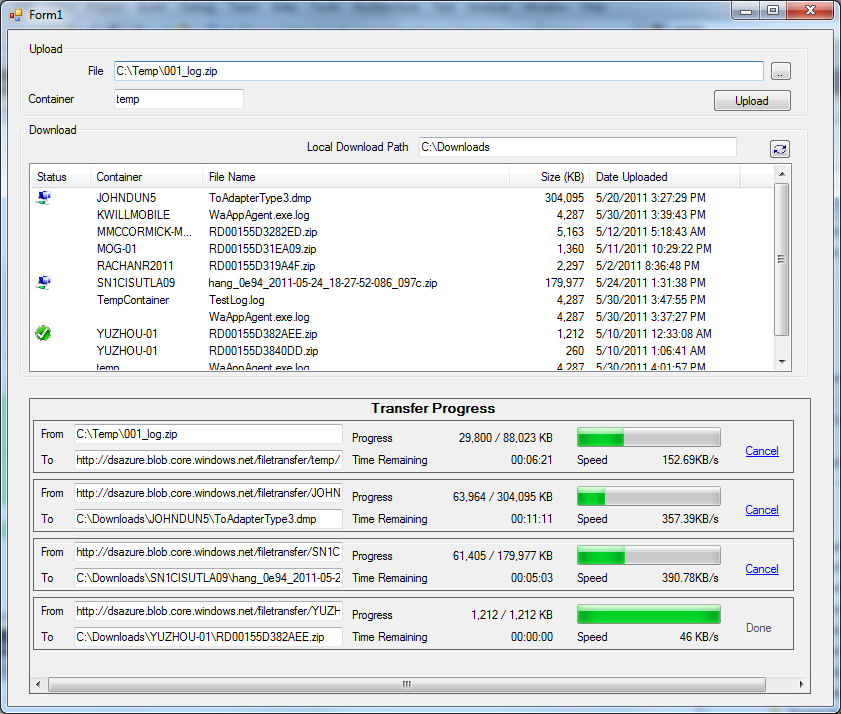
For a more full featured sample check out the BlobTransferUI project for simple UI showing progress bars for multiple simultaneous uploads and downloads.
Edit June 19, 2011
- Fixed some issues in BlobTransfer to change some int’s into long’s in order to fix a bug when transferring a >2GB file. Thanks to Jeff Baxter with our HPC team for helping me discover the issue.