
Announcing Hilo

What is Hilo?
Project “Hilo” is an effort to tell the story of building high performing, responsive rich Windows applications using C++. We will do this by walking you through our own experience of building some sample applications which we believe provide differentiated user experiences. We will tell you everything from setting up the development environment to taking advantage of the feature set of Windows 7.
The Samples
The first of these sample applications is a photo browser that implements a touch-enabled user interface for browsing photos on your computer. We call it the Hilo Browser. Below is a screenshot:
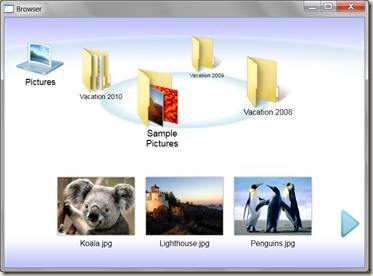
This application illustrates how to take advantage of the following Windows functionalities:
- Direct2D: For high performance and high-quality rendering of graphics.
- Windows Animation Manager: To give the application a unique personality and to improve the user experience.
- Windows Touch: To provide a more natural user interface through which the user can just “point” and “do”.
- Libraries: To enable the application to provide users with a single, coherent view of their files.
- Shell API: To navigate the images, to optimize by using the pre-built thumbnail cache and also to provide folder icons from their actual content.
You can download the source code for this application from the Hilo Code Gallery Page.
Over the coming weeks, we’ll be publishing a series of articles on MSDN Library (here) that will provide the walkthrough promised above. The introductory article is already up.
If you have questions or comments about the sample code, the usage of technologies or anything in general, please feel free to let us know through the Hilo Discussions Page.
You can also follow Hilo updates on Twitter @projecthilo.
We’ll soon be publishing the next article in the series, which will describe in detail how to prepare your development environment for Windows development. Stay tuned for more updates soon!


 Light
Light Dark
Dark
0 comments