
PIX on Windows
Performance tuning and debugging for DirectX 12 games on Windows
Latest posts

PIX 2503.24: misc bug fixes

Today we released PIX version 2503.24, which can be downloaded here. This release includes everything in the previous 2501.30 release, plus the following bug fixes:
PIX 2501.30-preview: Application Specific Driver State, Recreate At GPUVA and Tight Alignment

Today we released PIX version 2501.30-preview, available for download here. This release has initial support for the exciting new D3D12 features that were released in a preview DirectX Agility SDK today. Please visit this blog post for more information about the Agility SDK release. 2501.30-preview is a preview version of PIX. It is identical to 2501.30 (non-preview) except it also has support for the new preview D3D12 features. We only recommend using this version of PIX if you are trying out the new D3D12 features. We recommend that all other PIX users stick to the most recent regular version of PIX availabl...
PIX 2501.30 – Support for Shader Hash Bypass, bug fixes, and everything in 2412.12
Today we released PIX version 2501.30, which can be downloaded here. This release includes support for everything that was in the 2412.12 version of PIX, plus the following improvements: Support for Shader Hash Bypass PIX has full support for this new D3D12 feature that allows apps to bypass shader hash validation in D3D12 runtime by embedding a sentinel BYPASS hash value in any shader binary. For more information about Shader Hash Bypass, please visit this blog post. GPU Captures: Timing Captures: As usual, please send your suggestions and/or feedback to us via the feedbac...
PIX 2412.12 – Texture/Buffer/Visualizer improvements, Work Graph Shader Debugging, and many Timing Capture improvements
Today we released PIX on Windows version 2412.12, which can be downloaded here. This release includes several new improvements to GPU Captures and Timing Captures, including: GPU Captures: Timing Captures: As always, nearly all of the new functionality in this release was added in direct response to customer feedback. Please continue to contact us with your issues and requests! The best ways to reach us are via the "Send Feedback" button in the top-right corner of PIX, and via the #pix channel on the DirectX Discord. GPU Captures Custom Buffer/Texture/Mesh Visualizer Impro...
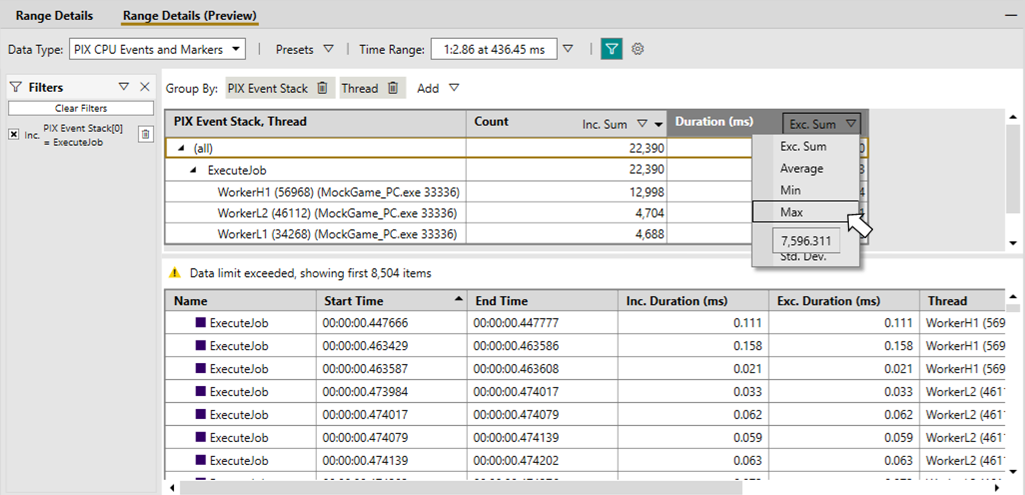
Timing Capture Range Details “v2”

Release 2412.12 of PIX on Windows includes a Preview of a new implementation of the Range Details view in Timing Captures. The initial implementation of the Range Details view allowed you to list individual data items for a given range of time. While this capability provided several basic scenarios, it was not flexible enough to support many of the analysis scenarios that PIX users have requested over the last few years. Limitations of the current Range Details view include a limited, hard-coded set of filtering and grouping capabilities per data type. Additionally, aggregations are not provided for most ...
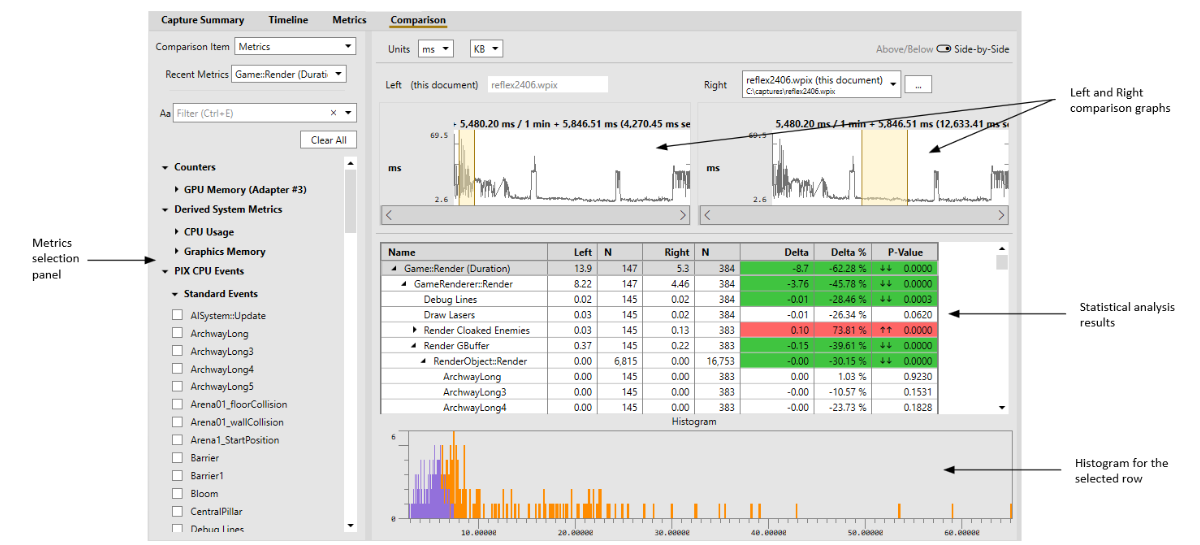
The Timing Capture comparison layout
Starting with version 2408.05 of PIX on Windows, the Timing Capture comparison features have been moved from the Metrics view to a new dedicated Comparison Layout. This layout improves several comparison workflows, including the ability to compare data from multiple captures. The Comparison Layout produces a statistical comparison of the average duration for the points that represent PIX event hierarchies in two selected ranges of time, or for the points above and below a metric's budget. Statistical comparisons help determine which portions of the event hierarchies had statistically different durations for t...
PIX 2409.23 – Support for new devices, bug fixes, and everything in 2408.09
Today we released PIX version 2409.23, which can be downloaded here. This release includes everything that was in the 2408.09 version of PIX, plus the following improvements: GPU Captures: Timing Captures:
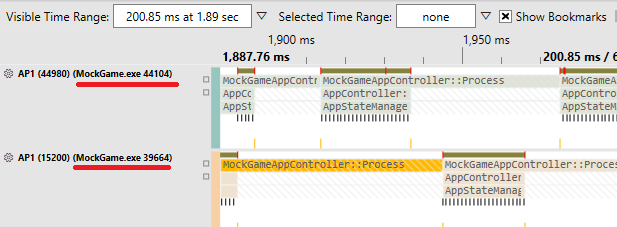
Multi-process profiling support in Timing Captures
Starting with the 2408.05 release of PIX on Windows, performance data from multiple processes can be analyzed with a single Timing Capture. The ability to analyze multiple processes simultaneously is useful in scenarios where multiple copies of a game server are running on the same machine, for example. PIX will capture data from all running processes on a machine when a Timing Capture is taken. However, callstacks are only captured for the title process that you started, or attached to, from the PIX UI. In multi-process scenarios, you'll want to check the Callstacks for non-title processes checkbox before ...
PIX 2408.09 – Bug fixes + everything in 2408.05
Today we released PIX version 2408.09, which can be downloaded here. This release includes everything that was in the 2408.05 version of PIX, plus the following bug fixes: