
Hilo Update – Introducing “Hilo Annotator”

In May this year, we announced Project Hilo and promised a set of cool sample applications written in C++. At that time we had released the first application in the Hilo series. Since then we have published some articles that walk the reader through all the steps that go into developing the Hilo Browser application (Chapter 1 thru 8 on this link). These articles describe the way we implemented the application in C++, our thought process for designing the application, as well as deep discussions on the source code and implementation using C++ and the modern application features in Windows 7.
Now we are back with the next application in the Project Hilo series. We call it the Hilo Annotator. Below is a screenshot:
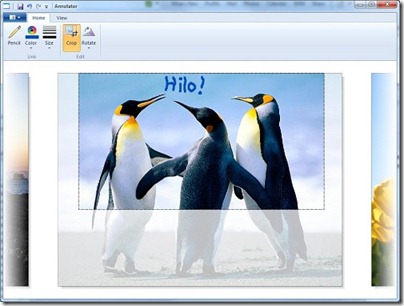
This application provides basic image editing capabilities but more importantly it illustrates how to take advantage of the following Windows functionalities:
- Ribbon: To provide a modern, easy to use and easy to learn user interface.
- Windows Imaging Component (WIC): To display and manipulate images.
- Even more of technologies like Windows Animation Manager and Direct2D that we have seen in the previous articles.
This series of articles and sample code are meant to show that the modern features that Windows 7 provides are accessible to the C++ programmer in efficient programming interfaces that are as close to the platform as you can get.
You can download the source code for this application from the Hilo Code Gallery Page. The article introducing the Hilo Annotator app can be found here. As we did earlier, over the coming weeks we will be publishing a series of articles on MSDN library (here) that will provide the walkthrough for building this app.
As usual, you can also follow Hilo updates on Twitter @projecthilo. Stay tuned.


 Light
Light Dark
Dark
0 comments